The High-Volume Screening Challenge
Time Bottleneck
Even at 2 minutes per resume, reviewing 500 applications takes more than 16 hours before accounting for breaks, note-taking, and context switching.
Volume Overload
Campus drives and hiring campaigns generate hundreds of applications that need quick processing.
Inconsistent Evaluation
After reviewing hundreds of resumes, fatigue sets in. Later candidates may not get the same attention as earlier ones.
Understanding the Scale of the Problem
When you're staring at a folder of 500 resumes, the traditional approach—opening each one individually, scanning for keywords, making notes—becomes unsustainable. Even at just 2 minutes per resume, that's over 16 hours of continuous screening. In reality, with context switching and fatigue, it takes much longer.
For recruitment consultancies handling multiple clients simultaneously, this creates a significant bottleneck. Campus drives, seasonal hiring campaigns, and rapid-growth companies can all generate hundreds of applications in days. The traditional manual process simply wasn't designed for this scale.
The impact extends beyond just time. Recruiter fatigue leads to inconsistent evaluations—candidates reviewed at the start of the day often receive more thorough consideration than those reviewed after hours of continuous screening. This inconsistency can result in missing strong candidates or, worse, unfair treatment of applicants.
How AI Changes the Equation
AI resume screening tools like Empikalyze take a fundamentally different approach. Instead of manually reading each document, you upload your job description and all resumes at once. The AI then analyzes each resume against your requirements using semantic matching—not just keyword spotting, but understanding the context of skills and experience.
This contextual understanding is crucial. A traditional keyword filter might miss a candidate who writes "React development for 5 years" if you're searching for "frontend developer with React." Semantic matching can identify related skills and experience even when a resume does not use the exact wording in the job description, giving recruiters another way to find potentially relevant candidates.
The result is a ranked list of candidates, each with a match score indicating how well they align with your job requirements. Instead of reviewing 500 resumes sequentially, you can start with higher-ranked candidates and use recruiter judgment to decide who should move forward.
The AI Screening Workflow
Define Your Requirements
Upload or paste your job description with all requirements. Include skills, experience level, and any specific qualifications you're looking for.
Bulk Upload Resumes
Upload up to 100 resumes per batch in PDF, DOCX, DOC, or TXT format. For 500 resumes, you'd process them in 5 batches.
AI Analysis
AI analyzes each resume against your job requirements using semantic matching, understanding context beyond simple keywords.
Get Ranked Results
Receive a prioritized list with match scores for each candidate. Focus your review on the highest-scoring applicants first.
See AI Screening in Action
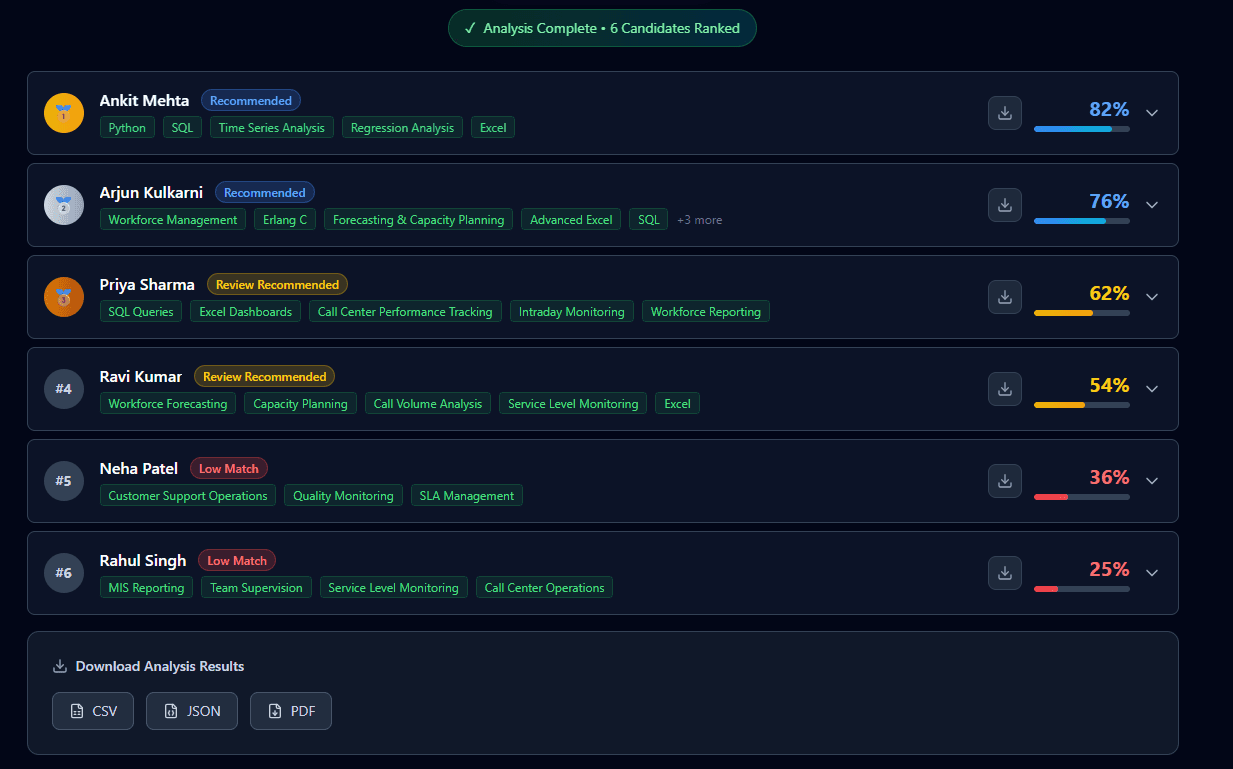
Ranked Candidates for Review
From 500 resumes to a prioritized shortlist. Each candidate gets a match score based on how well their qualifications align with your job requirements.
Best Practices for High-Volume Screening
Success with high-volume screening isn't just about having the right tools—it's about using them effectively. Here are key practices that can help you maximize efficiency while maintaining quality.
Start with a Clear Job Description
- Document must-have vs nice-to-have skills separately
- Include specific experience requirements
- Mention any certifications or qualifications needed
Process in Manageable Batches
- Upload 100 resumes at a time for optimal processing
- Review results between batches to refine criteria if needed
- Keep track of which batches you've processed
Focus on Top Candidates First
- Review highest-scored candidates before moving down the list
- Start with the highest-ranked candidates, then expand the review if needed
- Don't feel obligated to review every single resume
How to Screen Bulk Resumes
Screening resumes in bulk is fundamentally different from reviewing a handful of applications. The goal is not to read every resume cover-to-cover — it is to quickly surface the strongest matches so your time goes into conversation, not filtering. Here is a practical approach that works whether you are handling 100 resumes or 500.
Organize before you upload. Group resumes by role or client before screening. A single folder of resumes for one position keeps comparisons fair, because every resume is being measured against the same role.
Standardize formats where possible. Empikalyze supports the file types accepted by the current upload flow. Keeping resumes in consistent formats can make large batches easier for recruiters to organize and manage.
Prepare one clean job description. Paste the JD you would give to a human reviewer. Clearer requirements give the screening process a more consistent basis for comparing candidates. Then upload resumes in batches of up to 100 and review results between batches. See the bulk resume screening tool for the exact upload workflow.
The Bulk Resume Screening Process
Treating bulk screening as a repeatable process — rather than an ad-hoc scramble every time a large batch arrives — saves time and reduces errors. A simple workflow looks like this:
- Intake. Collect every resume for a role into one channel — a shared folder, a WhatsApp group export, or an email label. Avoid letting resumes sit in individual inboxes.
- Job-description prep. Lock the requirements before screening starts. Changing the JD halfway through forces you to re-rank the entire batch.
- Bulk upload. Upload up to 100 resumes per batch against the same JD so candidates in that screening run are compared against the same role requirements.
- AI ranking. Let the model score and order candidates. This can reduce hours of repetitive first-pass review by helping recruiters prioritize which resumes to examine first.
- Human review of the top tier. A recruiter reads the top-ranked candidates in depth and decides who moves forward.
- Outreach. Contact the strongest matches while the rest of the batch is still available as a backup pool.
This process is deliberately not linear. If the top tier does not yield enough strong candidates, you drop down the ranked list. If the JD was wrong, you fix it once and re-run — not 500 times.
How to Screen Hundreds of Resumes
Volume adds up quickly. At 2 minutes per resume, 300 resumes cost 10 hours and 500 cost over 16. The trick to screening hundreds of resumes without losing quality is knowing when to stop.
Batch math. A 500-resume batch breaks down into five batches of 100. Process them sequentially against the same JD, and review the ranked results of each batch before starting the next. This keeps the human review loop tight and lets you catch a misaligned JD early instead of after all 500 are processed.
When to stop reviewing. Once you are deep into a ranked list and the match scores have clearly dropped off, continuing to review marginal candidates has diminishing returns. Start by reviewing a manageable top tier, such as the highest-ranked 10–15%, then expand the review if you have not found enough suitable candidates. Keep the next tier as backup.
Multiple roles at once. When you are screening for several positions in parallel, do not pool the resumes. Keep one folder and one JD per role. Mixing candidates for unrelated positions can produce less useful results because every resume in a screening run should be evaluated against the requirements of the same role.
How to Shortlist Bulk Resumes
Ranking and shortlisting are not the same thing. A ranked list tells you the order of fit; a shortlist is the decision you make from it. Once you have a ranked batch of hundreds of resumes, the shortlisting step is where recruiter judgment matters most.
Define a cutoff. Pick a match-score threshold or a fixed number (for example, the top 30 candidates) as your initial shortlist size. Having a defined cutoff prevents "just one more" from turning into re-reading the entire batch.
Cross-check the top candidates. AI ranking helps surface candidates with stronger apparent alignment to the JD, but a high match score still needs human review because context, depth of experience, career progression, and role-specific nuances may not be fully captured by a ranking alone. Reviewing the initial shortlist manually helps recruiters consider these factors before deciding who moves forward.
Document the criteria. Note why candidates were advanced or rejected. This helps you explain shortlisting decisions to hiring managers and clients, and it is what turns a one-off batch into a repeatable process. For a deeper framework on the shortlisting decision itself, see our guide on how recruiters shortlist resumes.
How AI Screening Helps
AI-Powered Analysis
Upload up to 100 resumes in a batch. AI compares each resume against your job description and returns ranked results for review.
Ranked Shortlists
Get candidates ranked by match score. Focus your energy on the most promising applicants first.
Less Repetitive Review
Use AI to prioritize resumes for review so recruiters can spend less time on repetitive first-pass filtering.
Related Articles
How Recruiters Shortlist Resumes
Learn the complete resume shortlisting process from keyword filtering to semantic matching.
Bulk Resume Screening Guide
Master bulk screening for campus drives and hiring campaigns with proven strategies.
AI Screening vs Manual Screening
Compare productivity and accuracy between AI-assisted and traditional manual review.
Bulk Resume Screening Tool
Explore Empikalyze's bulk upload capabilities for high-volume hiring scenarios.